GoodApps / Tyler

Tyler
Feature-packed, lightweight and beautiful.
Tyler RSS.
A beautiful, lightweight RSS reader for the publications you love. Read full articles offline and keep a searchable library of stories worth saving.
RSS, Atom & JSON feeds. No account. No app telemetry.
v0.1.3 · macOS, Windows, Linux · Free & open-source
Your library stays on your computer · No subscription · MIT license
- Availability
- Free and open-source
- Feeds
- RSS, Atom, JSON Feed
- Platforms
- macOS 13.3+, Windows, Linux
- Built with
- Tauri, Rust, React, SQLite
- Your library
- Local. No account or app telemetry.
Keep yourself updated with the publications you love
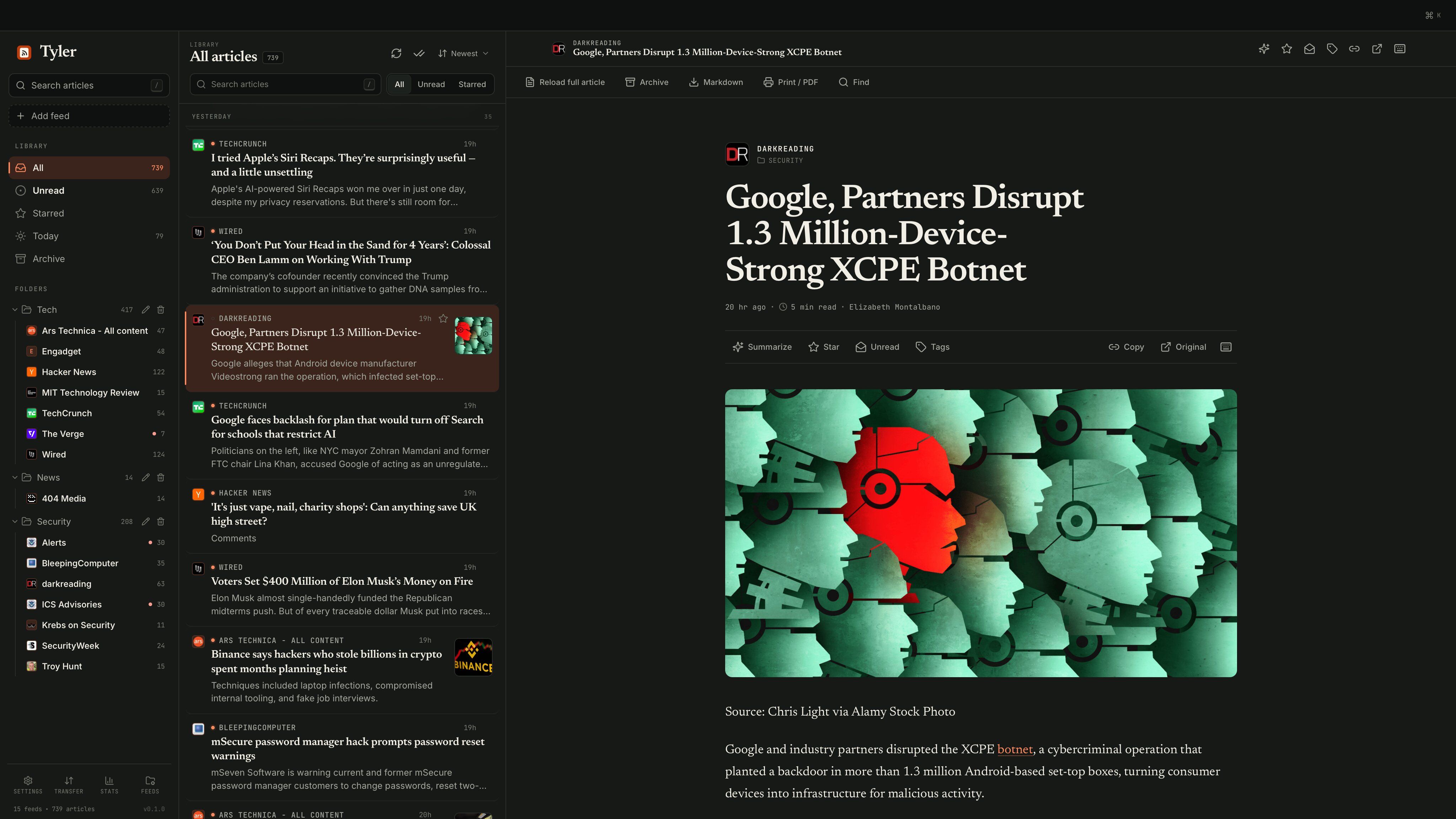
- Start with what you love — Paste a website or feed URL, import OPML, or pick several publications from the 90+ feed starter catalog. Keep them organized with folders, tags, and smart views.
- Read comfortably, even offline — Load full articles, cache images, search your library, and choose the typeface, line width, density, and light or dark theme that suit you.
- Take your library with you — Star stories, export articles as Markdown or print to PDF, and move subscriptions or your whole library using OPML and portable backups.
Get started with Tyler.
Installers for v0.1.3 are available below. Choose your computer to download the installer directly. macOS requires version 13.3 or later. Linux packages target Ubuntu 24.04 or compatible systems. We show your platform first. Most Windows and Linux PCs use Intel / AMD. For Macs, check Apple menu → About This Mac: an Apple M-series chip means Apple silicon; an Intel processor means Intel.
Make yourself at home.
- Add your first feeds: paste a website/feed URL, choose publications from the starter catalog, or import an OPML file through Transfer.
- Settle into the reader: adjust the theme and typography in Settings → Reading. Choose Load full article when a feed only includes an excerpt.
- Linux AppImage: allow execution in your file manager or use
chmod +x, then open it. DEB and RPM installers are also available. - Desktop tray: closing the reader keeps Tyler running for refreshes and notifications. Choose Quit Tyler in the tray menu to exit.
External requests
Your subscriptions, articles, reading state, settings, and cached images live on your computer. Tyler sends no app telemetry and has no account or cloud sync service.
Feeds, feed discovery, OPML links, full articles, and images contact their sources. Original pages, streamed media, and embeds contact their providers. Feed/discovery requests, OPML-link imports, and full-article fetches add ref=tyler-rss.com when no ref parameter is present; this identifies the app, not an individual reader.
Optional summaries send article text only to the endpoint you configure when you request a summary. Your summary API key is saved locally and is included in exported backups.
This website uses the same Umami analytics as the rest of GoodApps; downloads are hosted on GitHub.
Good questions.
Can I read everything offline?
Saved article text and cached images are available offline. Load the full article before going offline if a feed only supplies an excerpt. Streamed audio, video, and original pages need a connection.
Will it extract articles from every site?
Full-article extraction works with public HTML pages. Paywalls, sign-in pages, and pages rendered entirely by JavaScript may need Open original.
Can I move my library?
Yes. Export subscriptions as OPML, or create a portable .tyler.zip backup of your library and cached media.
Where can I report an issue?
Use the GitHub issue tracker for bugs and feature requests.
Keep exploring